THE CRM EASE-OF-USE DEBATE · RESEARCH CHECKED OCTOBER 2026
A salesperson finishes a useful customer call. Updating the CRM should help them get on with the next one. Too often, it feels like the beginning of another task.
Sales teams need clear customer information and reliable follow-up. They also need software that fits the time between conversations. If the system requires a training session for every ordinary update, the business should question the setup before blaming the people using it.
A simple, sales-focused CRM deserves a place on the shortlist alongside Salesforce. The decision should come from the work your team performs and the capabilities the business needs. A familiar brand or a long feature list cannot settle that decision.
Every unnecessary field has somebody's time attached
Required information has a purpose: a colleague needs context, an action needs an owner, or a manager needs to understand an opportunity. Problems start when the daily screen asks for details that nobody uses, or when the same information must be entered twice.
A useful sales view should make it easy to find the customer, understand the recent conversation and decide what to do next. After a call, the salesperson should be able to record what matters and set the follow-up while the details are fresh. On a phone between visits, that convenience becomes particularly valuable.
Salesforce's 2026 State of Sales report says 42% of sales reps feel overwhelmed by too many tools. That is a supplier-reported survey finding about sales technology generally. It does not establish that Salesforce causes the problem or that replacing it with Raptool removes it. It does justify asking whether another screen or process helps the person doing the selling.
Salesforce is not one giant, identical product
A fair comparison must name an edition. Salesforce offers Free, Starter and Pro suites as well as its broader sales platform. Its Starter guidance describes a simplified design and guided onboarding for smaller businesses. Saying that every Salesforce customer needs a large implementation team would be misleading.
There are good reasons to choose a broader platform. A business may need sales, service and marketing to work together, or require deeper reporting and automation. Salesforce's edition comparison distinguishes those capabilities and their limits. Where they solve a current business problem, the additional scope can justify the investment.
Ease of use also depends on configuration. Salesforce's Starter and Pro setup guidance covers importing contacts, connecting email and managing sales paths. A well-configured edition may suit your team. An overcomplicated setup can make any CRM harder to use.
The argument for a focused CRM is strongest when the business can name the work it needs and has little use for the additional platform scope. Then a shorter setup and a clearer daily routine become requirements to test.
Start with the customer and the next action
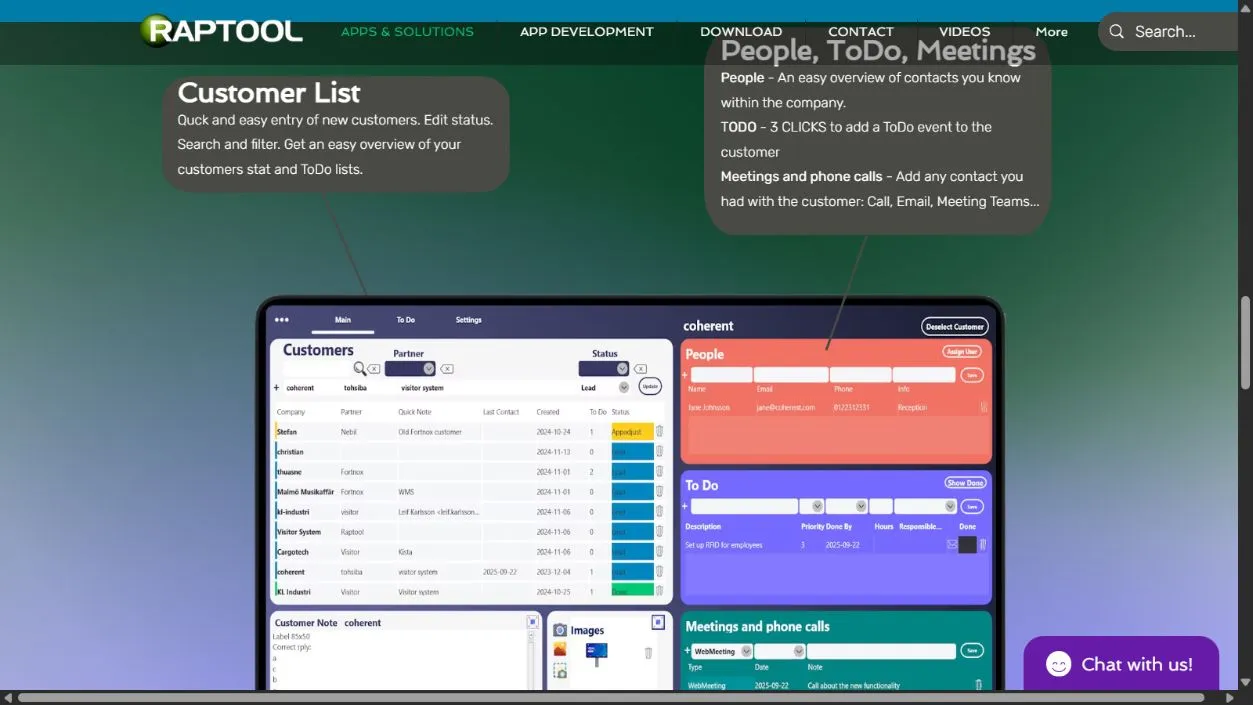
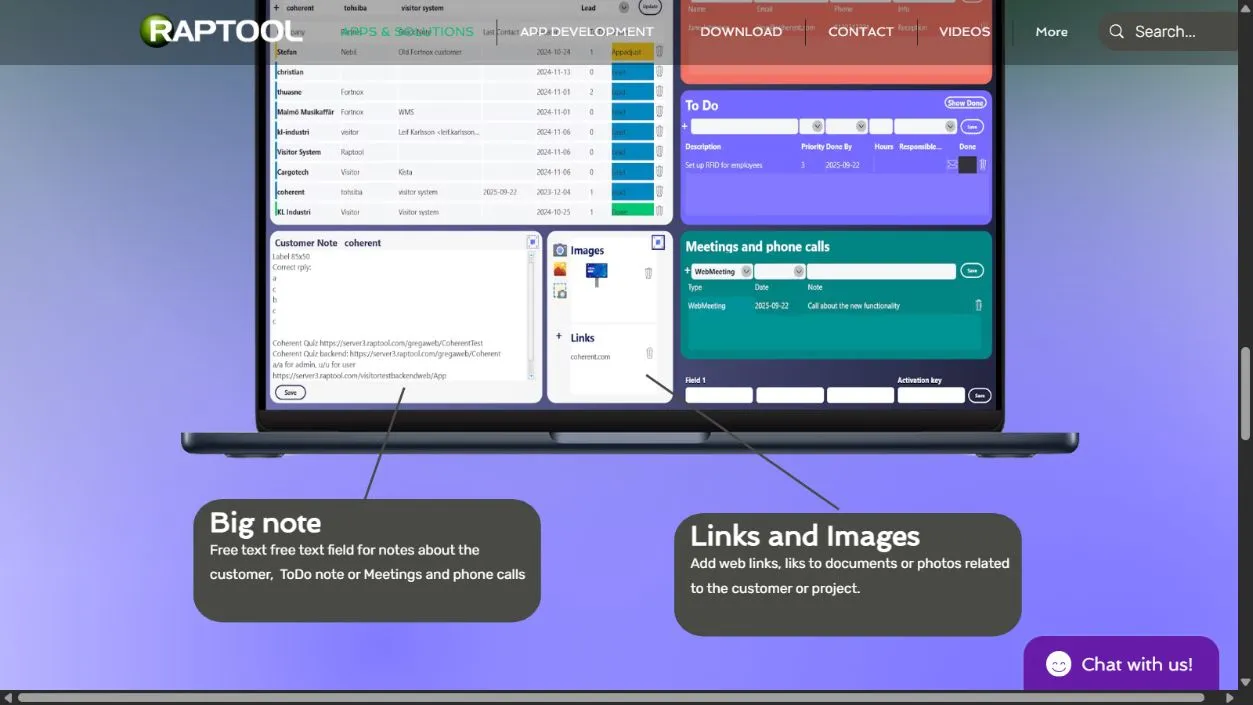
Raptool presents its CRM as a tool for sales professionals and project work. The live page shows customers, contacts, to-dos, conversation records, notes and links. It also advertises a three-click way to add a customer to-do. That click count is a supplier claim, not a result independently timed for this article.
A focused workflow can suit a team whose immediate needs center on keeping customer context together and following through on promises. Fewer setup choices can help if the available choices already match the job. Missing a necessary approval, report or integration creates more work elsewhere, so keep those requirements in the comparison.
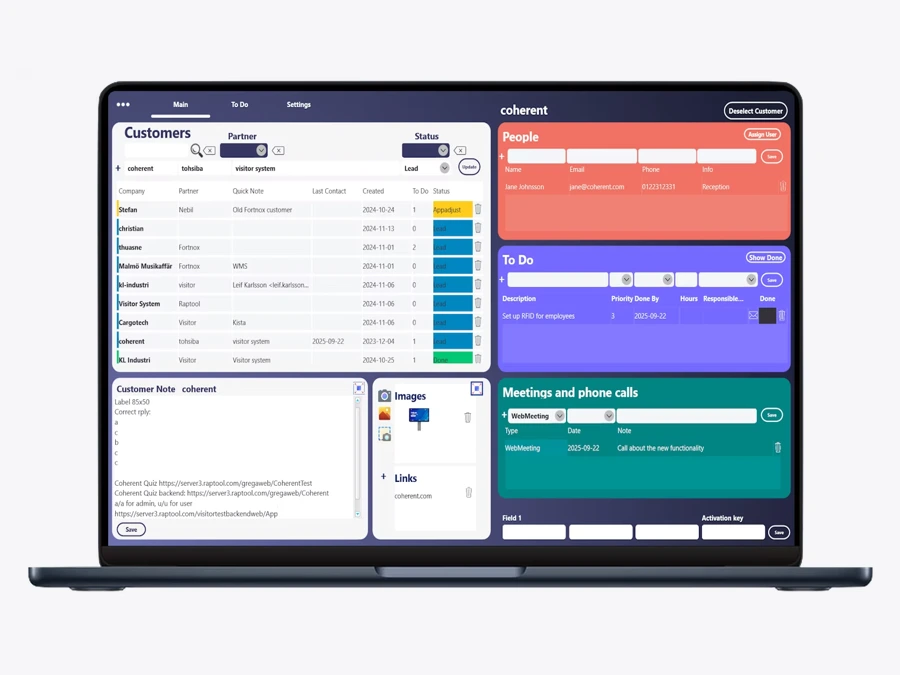
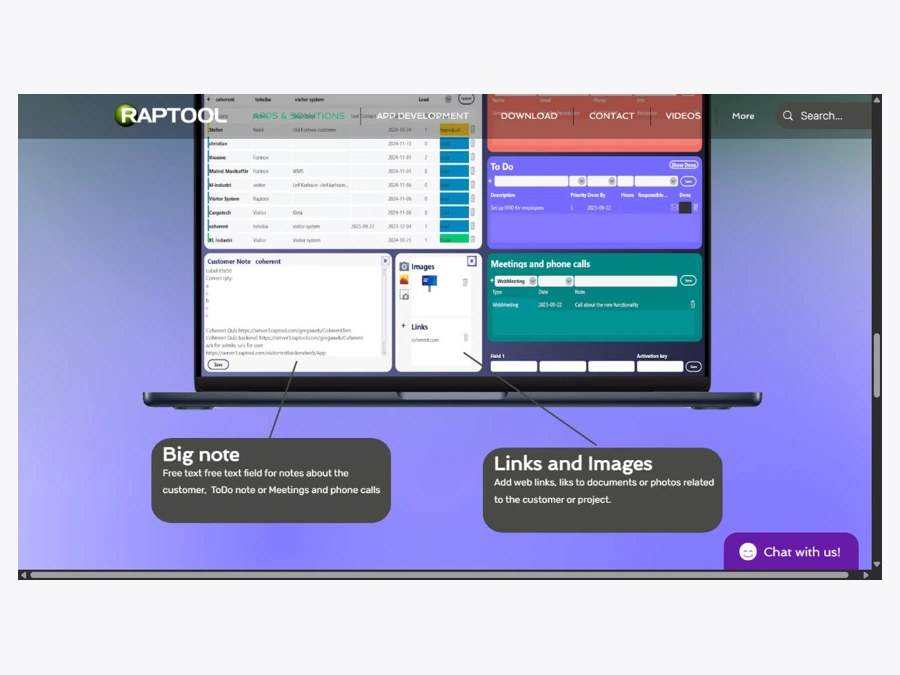
The public page is not a complete specification for permissions, forecasting, email synchronisation or migration. Ask Raptool to demonstrate anything your team depends on. This comparison is based on published material and screenshots, not a hands-on usability benchmark between logged-in products.
Compare the work your team will repeat tomorrow
| Requirement | Focused CRM such as Raptool | Salesforce |
|---|---|---|
| Daily customer work | Test the shown customer, contact, note and to-do workflow with your team. | Test the chosen edition and configured sales screens on the same tasks. |
| Getting started | Confirm import, setup and training effort; do not infer it from a simple screenshot. | Starter has guided onboarding; setup effort still depends on scope and data. |
| Wider business scope | Verify required reporting, permissions and connections before committing. | Compare the documented edition limits for cross-team tools and automation. |
| Ongoing ownership | Find out who changes fields, handles access and resolves support issues. | Budget for administration appropriate to the chosen configuration. |
| Ease of use | Measure task completion, corrections and help requests. No universal winner is established by this article. | |
A cheap license can still buy an expensive routine
At the October 2026 check, Raptool's page advertised US$7 per user per month. Salesforce's U.S. pricing page listed Starter at US$25 and Pro at US$100 per user per month, with Pro billed annually; it also listed a Free Suite. These are public list prices with different scope and conditions, not like-for-like quotes. Confirm current terms, inclusions, taxes and availability.
Compare the full cost of the setup you need, including migration, training, administration, support and connections. A larger license bill can be justified by capabilities you use. A lower one stops looking attractive if the team compensates with repeated manual work.
Three extra minutes can consume 120 hours a year
If ten sellers each spend three extra minutes a day on avoidable CRM work over 240 days, the total is 10 × 3 × 240 ÷ 60 = 120 hours.
At an assumed loaded labor cost of €35 an hour, that is €4,200 of staff capacity. The example assigns no measured time advantage to either product. Released time is not automatically a payroll saving or additional sales.
Run that calculation using observed times from a trial. Keep license quotes in their quoted currency unless you document an exchange rate. Do not convert the capacity figure into a promised return on investment.
Give the salesperson the mouse
A polished demonstration shows what a trained presenter can do. A useful trial shows whether your people can do their own work. Use the same sample customer information in both systems and let a salesperson add a contact, record a conversation, create the next action and hand it to a colleague.
Time the complete task, including corrections. Check a phone workflow if staff work between visits. Ask a manager to find overdue work and produce the report needed for the next sales meeting. Then test access changes and export: an easy first day should not come at the cost of a difficult departure.
Choose Salesforce when the edition and configuration meet needs that justify their total effort and cost. Choose a focused CRM when it covers the necessary work and your team can maintain it with less effort in the trial. If neither works, change the shortlist or simplify the process before buying.
Salespeople should finish a customer call knowing what happens next. Their CRM should make that easier.
Test the routine before buying the platform
Use Raptool CRM as one candidate and compare it with the Salesforce edition you would actually buy. Bring the tasks your salespeople repeat, including the awkward ones.
Questions behind the CRM decision
Is a sales-focused CRM always easier than Salesforce?
No universal winner is established here. Salesforce offers simplified suites, and ease of use depends on the edition, configuration and task. Compare both with the same customer work and the people who will use the system.
What does the Raptool CRM page show?
The live page shows customer lists, search and filters, contacts, to-dos, logged conversations, notes and linked information. Required reporting, permissions, migration and integrations still need to be demonstrated.
Was Raptool independently timed against Salesforce?
No. This article compares published material and proposes a trial. Its 120-hour workload example is hypothetical and assigns no measured speed advantage to either product.
Sources and scope
Research checked October 2026. Supplier features and findings are linked beside the relevant claims. Workflow advice and the financial examples are our analysis. No logged-in product benchmark or guaranteed sales improvement is claimed. View the full Raptool CRM page capture.