- Year introduced
- 2022
- Capacity
- 64 GB, 256 GB
- Color
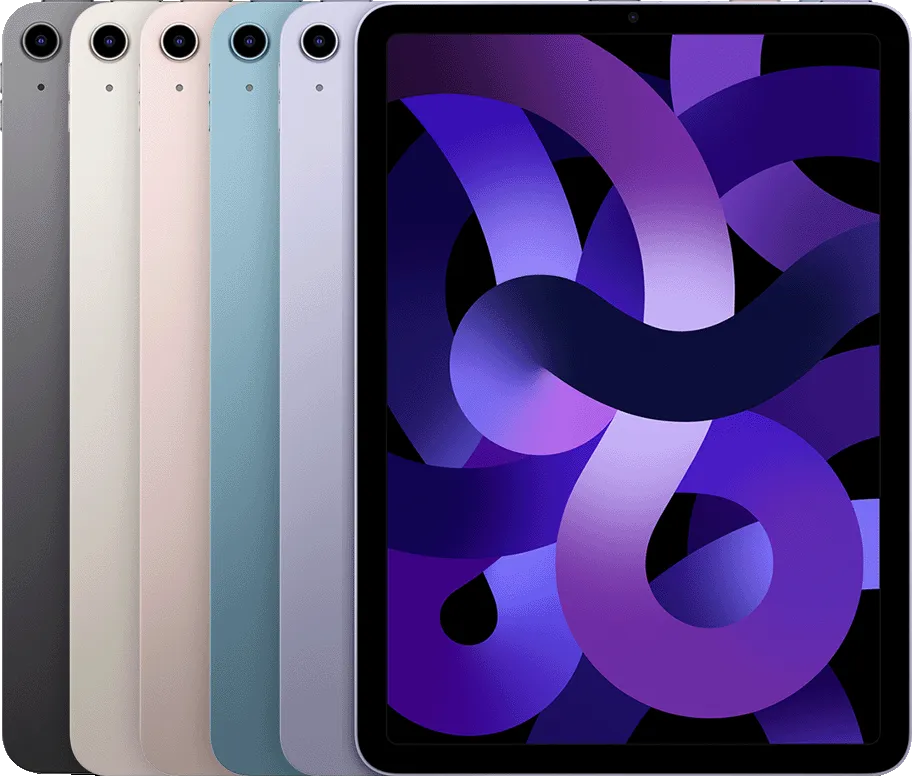
- Space Gray Starlight Pink Purple Blue
- RAM / storage options
- 64GB 256GB
- Dimensions / weight
- Wi-Fi models Height: 9.74 inches (247.6 mm) Width: 7.02 inches (178.5 mm) Depth: 0.24 inch (6.1 mm) Weight: 1.02 pounds (461 grams)
Wi-Fi + Cellular models Height: 9.74 inches (247.6 mm) Width: 7.02 inches (178.5 mm) Depth: 0.24 inch (6.1 mm) Weight: 1.02 pounds (462 grams)
- Buttons and Connectors
- Front camera Top button/Touch ID Volume buttons Rear camera Smart Connector USB-C connector SIM tray (Wi-Fi + Cellular) Magnetic connector for Apple Pencil
- In the Box
- iPad Air (5th generation) USB‑C Charge Cable (1 meter) 20W USB‑C Power Adapter
- Display
- Liquid Retina display 10.9-inch (diagonal) LED‑backlit Multi‑Touch display with IPS technology 2360-by-1640-pixel resolution at 264 pixels per inch (ppi) Wide color display (P3) True Tone display Fingerprint-resistant oleophobic coating Fully laminated display Antireflective coating 1.8% reflectivity 500 nits brightness Supports Apple Pencil (2nd generation) , Apple Pencil (USB‑C)
The iPad Air display has rounded corners. When measured diagonally as a rectangle, the screen is 10.86 inches. Actua
- Processor
- Apple M1 chip
8-core CPU with 4 performance cores and 4 efficiency cores 8-core GPU 16-core Neural Engine 8GB RAM
Media engine
Hardware-accelerated H.264 and HEVC Video decode engine Video encode engine
- Apple Intelligence
- Built into your iPad, Apple Intelligence is the personal intelligence system that helps you write, express yourself, and get things done effortlessly. With groundbreaking privacy protections, it gives you peace of mind that no one else can access your data — not even Apple.
Learn more about Apple Intelligence
- Camera
- 12MP Wide camera, ƒ/1.8 aperture Digital zoom up to 5x Five-element lens Autofocus with Focus Pixels Panorama (up to 63MP) Smart HDR 3 Wide color capture for photos and Live Photos Photo geotagging Auto image stabilization Burst mode Image formats captured: HEIF and JPEG
- Video Recording
- 4K video recording at 24 fps, 25 fps, 30 fps, or 60 fps 1080p HD video recording at 25 fps, 30 fps, or 60 fps 720p HD video recording at 30 fps Slo‑mo video support for 1080p at 120 fps or 240 fps Time‑lapse video with stabilization Extended dynamic range for video up to 30 fps Cinematic video stabilization (4K, 1080p, and 720p) Continuous autofocus video Playback zoom Video formats captured: HEVC and H.264
- Front Camera
- 12MP Ultra Wide front camera, 122° field of view ƒ/2.4 aperture Smart HDR 3 1080p HD video recording at 25 fps, 30 fps, or 60 fps Time‑lapse video with stabilization Extended dynamic range for video up to 30 fps Cinematic video stabilization (1080p and 720p) Wide color capture for photos and Live Photos Lens correction Retina Flash Auto image stabilization Burst mode
- Video Calling
- FaceTime video Center Stage iPad to any FaceTime‑enabled device over Wi-Fi or cellular
- Audio Calling
- FaceTime audio iPad to any FaceTime‑enabled device over Wi-Fi or cellular
- Speakers
- Stereo speakers
- Microphones
- Dual microphones for calls, video recording, and audio recording
- Wireless connectivity
- All models
Wi-Fi 6 (802.11ax) with 2x2 MIMO; speeds up to 1.2 Gbps Simultaneous dual band Bluetooth 5.0
Wi-Fi + Cellular models
Model A2589: 5G NR (Bands n1, n2, n3, n5, n7, n8, n12, n20, n25, n28, n29, n30, n38, n40, n41, n48, n66, n71, n77, n78, n79) 4 FDD-LTE (Bands 1, 2, 3, 4, 5, 7, 8, 11, 12, 13, 14, 17, 18, 19, 20, 21, 25, 26, 28, 29, 30, 32, 66, 71) TD-LTE (Bands 34, 38, 39, 40, 41, 42, 46, 48) UMTS/HSPA/HSPA+/DC‑HSDPA (850, 900, 1700/2100, 1900, 2100 MHz) Data only 5 Wi-Fi calling 4 eSIM
- SIM Card
- Nano‑SIM eSIM 6
- Location
- All models
Digital compass Wi‑Fi iBeacon microlocation
Wi-Fi + Cellular models
GPS/GNSS Cellular
- Sensors
- Touch ID Three‐axis gyro Accelerometer Barometer Ambient light sensor
- Touch ID
- Unlock iPad Secure personal data within apps Make purchases from the iTunes Store, App Store, and Apple Books
- Apple Pay
- Pay with your iPad using Touch ID within apps and on the web Send and receive money in Messages
Learn more about Apple Pay
- Siri
- Use your voice to send messages, set reminders, and more Get proactive suggestions Use hands-free Listen and identify songs
Learn more about Siri
- Ports / expansion
- USB-C port with support for: Charging DisplayPort USB 3 (up to 10Gb/s)
- Display Support
- Supports full native resolution on the built-in display at millions of colors Supports one external display with up to 6K resolution at 60Hz
Digital video output Native DisplayPort output over USB‑C VGA, HDMI, and DVI output supported using adapters (sold separately)
Video mirroring Up to 4K AirPlay for mirroring, photos, and video out to Apple TV (2nd generation or later) or AirPlay‑enabled smart TV Video mirroring and video out support through USB-C Digital AV Multiport Adapter and USB-C VGA M
- Battery / runtime
- Built‐in 28.6‐watt‐hour rechargeable lithium‑polymer battery Up to 10 hours of surfing the web on Wi‐Fi or watching video Charging via power adapter or USB‑C to computer system
Wi-Fi + Cellular models
Up to 9 hours of surfing the web using cellular data network
- Operating system
- iPadOS
iPadOS comes with powerful features and built-in apps designed to take advantage of the unique capabilities of iPad.
Learn more about iPadOS
iPad User Guide
- Accessibility
- Built-in accessibility features supporting vision, mobility, hearing, and cognitive disabilities help you get the most out of your iPad.
Learn more about Accessibility
Features include:
VoiceOver Zoom Magnifier Spoken Content Voice Control Switch Control AssistiveTouch Siri and Dictation Type to Siri Real-Time Text Audio Descriptions Subtitles and Closed Captioning Live Captions (beta)
- Built-in Apps
- App Store Books Calendar Camera Clock Contacts FaceTime Files Find My Freeform Home iTunes Store Magnifier Mail Maps Measure Messages Music News Notes Photo Booth Photos Podcasts Reminders Safari Settings Shortcuts Siri Stocks Tips Translate TV Voice Memos Weather
- Free Apps from Apple
- Pages, Numbers, Keynote, iMovie, GarageBand, Clips, and Apple Store app are preinstalled on iPad.
Pages Numbers Keynote iMovie GarageBand Apple Store Clips Swift Playgrounds Support
- System Requirements
- Apple ID (required for some features) Internet access 9
Syncing to a Mac or PC requires:
macOS Catalina 10.15 or later using the Finder macOS High Sierra 10.13 through macOS Mojave 10.14.6 using iTunes 12.9 or later Windows 10 or later using iTunes 12.12.10 or later (free download from apple.com/itunes/download )
- Languages
- Language support
Arabic, Bulgarian, Catalan, Chinese (Simplified, Traditional, Traditional – Hong Kong), Croatian, Czech, Danish, Dutch, English (Australia, India, UK, U.S.), Finnish, French (Canada, France), German, Greek, Hebrew, Hindi, Hungarian, Indonesian, Italian, Japanese, Kazakh, Korean, Malay, Norwegian, Polish, Portuguese (Brazil, Portugal), Romanian, Russian, Slovak, Spanish (Latin America, Spain, U.S.), Swedish, Thai, Turkish, Ukrainian, Vietnamese
QuickType keyboard support
Ainu, Ak
- Video Playback
- Supported formats include HEVC, H.264, and ProRes Supports Dolby Vision and HDR10 content
- Audio Playback
- Supported formats include AAC, MP3, Apple Lossless, FLAC, Dolby Digital, Dolby Digital Plus, and Dolby Atmos Spatial audio playback User-configurable maximum volume limit
- Mail Attachment Support
- Viewable document types
.jpg, .tiff, .gif (images); .doc and .docx (Microsoft Word); .htm and .html (web pages); .key (Keynote); .numbers (Numbers); .pages (Pages); .pdf (Preview and Adobe Acrobat); .ppt and .pptx (Microsoft PowerPoint); .txt (text); .rtf (rich text format); .vcf (contact information); .xls and .xlsx (Microsoft Excel); .zip; .ics; .usdz; .pkpass (Wallet)
- Environmental Requirements
- Operating ambient temperature: 32° to 95° F (0° to 35° C) Nonoperating temperature: −4° to 113° F (−20° to 45° C) Relative humidity: 5% to 95% noncondensing Operating altitude: tested up to 10,000 feet (3000 m)
- iPad Air and the Environment
- iPad Air is designed with the following features to reduce its environmental impact: 11
Learn more about the iPad Air Product Environmental Report (PDF)
Made with better materials
100% recycled aluminum in the enclosure 100% recycled rare earth elements in the enclosure and audio magnets, representing 96% of the rare earth elements in the device 100% recycled tin in the solder of the main logic board 35% or more recycled plastic in multiple components
Energy efficient
ENERGY STAR ® certified 12
- Published identification feature
- Model number (on back cover): A2588 on iPad Air (5th generation) A2589, A2591 on iPad Air (5th generation) Wi-Fi + Cellular
- Published identification feature
- The nano-SIM tray is on the right side on iPad Air (5th generation) Wi-Fi + Cellular
- Published identification feature
- FaceTime HD camera, back Wide camera*
- Published identification feature
- Touch ID sensor in top button